
木头进销存软件怎么用
-
木头进销存是一款专门为木材行业设计的进销存管理软件,主要用于帮助木材企业实现库存管理、销售管理、采购管理等方面的自动化管理。下面是使用木头进销存软件的一般操作流程:
-
登录和基本设置:
- 打开木头进销存软件,输入用户名和密码登录系统。
- 设置基本信息,包括企业名称、地址、联系方式等。
-
添加商品:
- 进入商品管理界面,点击“新增商品”按钮。
- 填写商品信息,包括商品名称、规格、型号、单位、进价、售价等。
- 保存商品信息,系统会自动生成一个唯一的商品编号。
-
采购管理:
- 进入采购管理界面,点击“新增采购单”按钮。
- 选择供应商,输入采购商品数量、单价等信息。
- 确认采购单并保存,系统会自动生成一个唯一的采购单号。
-
销售管理:
- 进入销售管理界面,点击“新增销售单”按钮。
- 选择客户,输入销售商品数量、单价等信息。
- 确认销售单并保存,系统会自动生成一个唯一的销售单号。
-
库存管理:
- 在主界面查看当前库存数量、成本等信息。
- 点击“库存盘点”按钮,可以进行库存盘点操作。
- 系统会自动计算库存量,出入库情况等。
-
财务管理:
- 进入财务管理界面,可以查看采购、销售记录,生成财务报表。
- 可以进行财务分析,包括利润情况、应收账款、应付账款等。
-
报表功能:
- 系统提供各种报表,如进销存报表、销售排行榜、库存预警等。
- 可以根据需要导出或打印报表,方便经营管理和决策。
-
权限管理:
- 可以设置不同用户的权限,限制其操作范围,保障数据安全。
- 管理员可以对系统进行设置和维护,确保系统正常运行。
通过以上操作流程,您可以比较全面地了解如何使用木头进销存软件进行进销存管理。当然,具体操作可能因软件版本的不同而有所差异,建议您在使用过程中仔细阅读软件的操作指南或者联系软件厂商进行指导。
2年前 -
-
Wood Inventory Management Software Usage Guide
Introduction
Wood inventory management software is designed to help businesses efficiently manage their inventory of wood products. This software can track inventory levels, manage purchases and sales, generate reports, and streamline operations. In this guide, we will walk you through the usage of wood inventory management software, covering key functions such as inventory tracking, purchasing, sales, reporting, and more.- Installation and Setup
- Download the wood inventory management software from the official website or a trusted source.
- Install the software on your computer or server following the on-screen instructions.
- Launch the software and create a new account or log in with existing credentials.
- Set up your company profile, including business name, address, contact information, and relevant details.
- Configure settings such as currency, units of measurement, tax rates, and other custom preferences.
- Inventory Tracking
- Add new wood products to the inventory by entering details such as product name, description, category, cost, selling price, and current stock level.
- Assign unique product codes or barcodes to each item for easy identification.
- Update inventory levels by recording incoming and outgoing stock movements, such as purchases, sales, returns, and adjustments.
- Set up low-stock alerts to receive notifications when the stock of a particular item falls below a specified threshold.
- Conduct regular stock counts to reconcile physical inventory with the system records and make necessary adjustments.
- Purchasing
- Create purchase orders to replenish inventory by selecting the desired wood products, quantities, and suppliers.
- Send purchase orders to suppliers electronically or in print format directly from the software.
- Receive incoming stock against purchase orders, verifying the quantity and quality of the received items.
- Update inventory levels automatically upon receipt of purchased items, reflecting the new stock quantities in the system.
- Keep track of supplier information, such as contact details, payment terms, and purchase history for future reference.
- Sales
- Generate sales orders or invoices for customers when selling wood products, specifying the items, quantities, prices, and payment terms.
- Process sales orders by confirming product availability, creating delivery notes, and issuing invoices for payment.
- Record sales transactions in the system to update inventory levels, track revenue, and monitor customer purchases.
- Manage customer information, including contact details, payment history, and preferences to improve customer relationships.
- Generate sales reports to analyze sales performance, trends, best-selling products, and customer buying behavior.
- Reporting
- Run various reports to gain insights into your wood inventory, purchases, sales, and overall business performance.
- Generate inventory reports to view stock levels, value, turnover rates, and aging of products.
- Analyze purchase reports to track supplier performance, purchase costs, order frequency, and lead times.
- Review sales reports to monitor revenue, profit margins, sales trends, customer loyalty, and geographic sales distribution.
- Customize reports based on specific criteria, such as date range, product category, supplier, customer, or sales channel.
- Security and Backup
- Protect your data by setting up user access controls, restricting permissions based on roles and responsibilities.
- Regularly back up your data to prevent loss due to system failures, accidents, or cyber threats.
- Implement security measures such as encryption, firewalls, and antivirus software to safeguard sensitive business information.
- Store backups in secure locations, both onsite and offsite, to ensure data continuity and recovery in case of emergencies.
- Test backup and recovery procedures periodically to verify the integrity and reliability of your data protection measures.
Conclusion
Using wood inventory management software can significantly improve the efficiency and accuracy of managing your wood products. By following the steps outlined in this guide, you can effectively track inventory, streamline purchasing and sales processes, generate insightful reports, and secure your business data. Stay organized, stay informed, and stay ahead with the right tools for managing your wood inventory effectively.2年前 -
对于木头进销存软件的使用方法,可以分为以下几个方面进行说明:
一、系统登录
用户首先需要安装木头进销存软件,并进行注册或登录账号后,能够进入系统的主界面。二、基础设置
- 公司设置:设置公司基本信息,如公司名称、地址、联系方式等。
- 用户管理:管理系统内的操作人员,包括新增用户、删除用户、权限设置等。
- 商品管理:对公司所销售或生产的商品进行管理,包括商品信息、库存信息、价格信息等。
- 客户管理:管理公司的客户信息,包括客户姓名、联系方式、地址等。
三、进货管理
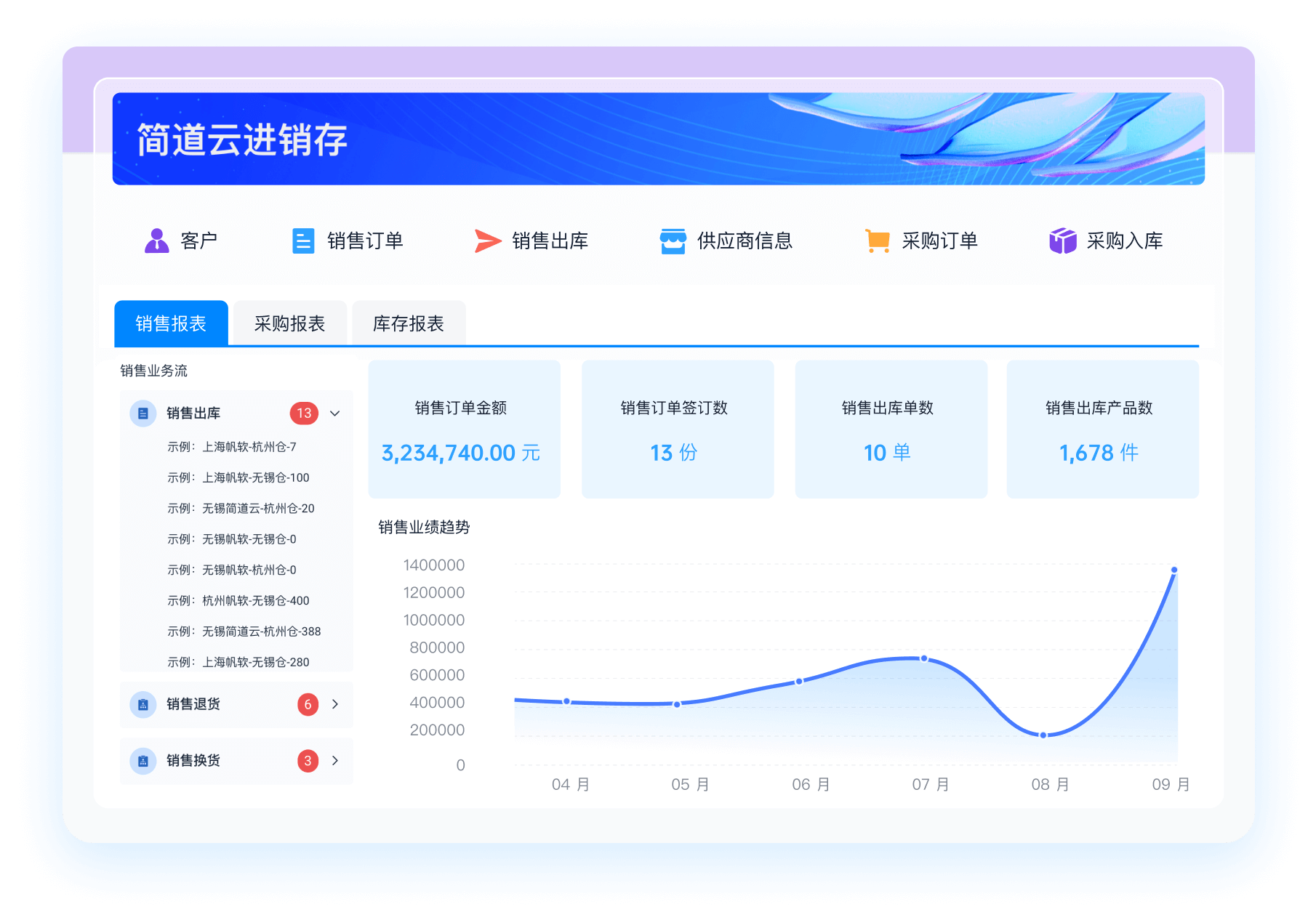
- 采购订单:生成采购订单,填写供应商信息、商品信息、数量、价格等。
- 入库管理:对采购的商品进行入库操作,更新库存信息。
- 供应商管理:管理公司的供应商信息,包括供应商名称、联系方式、地址等。
四、销售管理
- 销售订单:生成销售订单,填写客户信息、商品信息、数量、价格等。
- 出库管理:对销售的商品进行出库操作,更新库存信息。
- 客户管理:管理公司的客户信息,包括客户姓名、联系方式、地址等。
五、库存管理
- 库存盘点:对库存进行周期性的盘点,确保库存信息的准确性。
- 库存调拨:进行库存之间的调拨操作,保持各仓库间的库存平衡。
六、报表查询
木头进销存软件通常提供丰富的报表功能,包括销售报表、进货报表、库存报表等,用户可以根据需要查询相应的报表信息,帮助管理者进行数据分析和决策。综上所述,木头进销存软件主要包括基础设置、进货管理、销售管理、库存管理和报表查询等功能模块,用户可以根据公司的实际情况和需求进行相应的操作和管理。
2年前















































 《零代码开发知识图谱》
 《零代码
新动能》案例集
《零代码
新动能》案例集
 《企业零代码系统搭建指南》











领先企业,真实声音
简道云让业务用户感受数字化的效果,加速数字化落地;零代码快速开发迭代提供了很低的试错成本,孵化了一批新工具新方法。
郑炯蒙牛乳业信息技术高级总监
简道云把各模块数据整合到一起,工作效率得到质的提升。现在赛艇协会遇到新的业务需求时,会直接用简道云开发demo,基本一天完成。
谭威正中国赛艇协会数据总监
业务与技术交织,让思维落地实现。四年简道云使用经历,功能越来越多也反推业务流程转变,是促使我们成长的过程。实现了真正降本增效。
袁超OPPO(苏皖)信息化部门负责人
零代码的无门槛开发方式盘活了全公司信息化推进的热情和效率,简道云打破了原先集团的数据孤岛困局,未来将继续向数据要生产力。
伍学纲东方日升新能源股份有限公司副总裁
通过简道云零代码技术的运用实践,提高了企业转型速度、减少对高技术专业人员的依赖。在应用推广上,具备员工上手快的竞争优势。
董兴潮绿城建筑科技集团信息化专业经理
简道云是目前最贴合我们实际业务的信息化产品。通过灵活的自定义平台,实现了信息互通、闭环管理,企业管理效率真正得到了提升。
王磊克吕士科学仪器(上海)有限公司总经理