
 阅读时间:8 分钟
  浏览量:858次


Free Versions of Inventory Management Software
Free versions of inventory management software can offer numerous benefits, such as cost savings, basic functionalities, and ease of access. For instance, cost savings is a major advantage since businesses, especially small ones, can avoid the initial financial burden associated with purchasing a comprehensive software package. This allows them to allocate their resources more effectively towards other essential operations. The basic functionalities typically included in free versions are sufficient for startups or small businesses. These can help manage inventory levels, track sales, and generate basic reports, thereby improving overall efficiency without any cost. Additionally, ease of access is another significant benefit. Most free inventory management software are cloud-based, providing accessibility from anywhere with an internet connection, which is crucial for remote and multi-location operations.
I. COST SAVINGS
One of the primary advantages of using free versions of inventory management software is the significant cost savings. For small businesses and startups, budget constraints often make it difficult to invest in comprehensive inventory management solutions. Free software versions eliminate the initial financial burden, allowing businesses to allocate funds to other critical areas such as marketing, product development, or customer service. These savings can be substantial, especially when considering the costs associated with purchasing, installing, and maintaining enterprise-level software. Additionally, since many free versions come with no hidden fees or additional costs, businesses can better manage their finances and plan for future growth.
II. BASIC FUNCTIONALITIES
Free inventory management software usually includes a range of basic functionalities that can meet the needs of smaller businesses. These functionalities typically cover essential aspects of inventory management, such as:
- Inventory Tracking: Free software allows businesses to monitor inventory levels, helping to prevent overstocking or stockouts. This feature ensures that businesses always have the right amount of stock on hand, reducing waste and improving efficiency.
- Sales Tracking: Many free versions offer sales tracking capabilities, enabling businesses to monitor sales trends and identify popular products. This data can be used to make informed purchasing decisions and optimize inventory levels.
- Reporting: Basic reporting features are often included in free inventory management software, allowing businesses to generate simple reports on inventory levels, sales, and other key metrics. These reports can provide valuable insights into business performance and help identify areas for improvement.
- Order Management: Some free versions also include basic order management features, enabling businesses to create and manage purchase orders, track supplier information, and monitor order statuses.
III. EASE OF ACCESS
Another significant benefit of free inventory management software is the ease of access. Many free versions are cloud-based, meaning they can be accessed from any device with an internet connection. This is particularly advantageous for businesses with multiple locations or remote employees, as it allows them to manage inventory from anywhere, at any time. Cloud-based software also offers automatic updates and data backups, ensuring that businesses always have access to the latest features and security measures. Additionally, the user-friendly interfaces of many free inventory management solutions make them easy to navigate, even for those with limited technical expertise.
IV. SCALABILITY
While free inventory management software is typically designed for smaller businesses, many solutions offer scalability options. As a business grows and its inventory management needs become more complex, it can easily upgrade to a paid version with advanced features and capabilities. This flexibility allows businesses to start with a free version and gradually transition to a more comprehensive solution as their needs evolve. This scalability ensures that businesses can continue to effectively manage their inventory without the need for a complete overhaul of their systems.
V. INTEGRATION CAPABILITIES
Many free inventory management software solutions offer integration capabilities with other business tools and platforms. This can help streamline operations and improve overall efficiency. For example, integrating inventory management software with accounting software can automate financial processes and reduce the risk of errors. Similarly, integration with e-commerce platforms can help businesses manage online sales and inventory levels more effectively. These integrations can save time and resources, allowing businesses to focus on growth and customer satisfaction.
VI. CUSTOMER SUPPORT
Even free versions of inventory management software often come with customer support options. While the level of support may not be as comprehensive as that offered with paid versions, businesses can still access resources such as online help centers, FAQs, and community forums. These resources can provide valuable assistance with troubleshooting, setup, and general usage. Additionally, some free versions offer limited email or chat support, ensuring that businesses have access to the help they need to effectively manage their inventory.
VII. USER-FRIENDLY INTERFACE
Many free inventory management software solutions are designed with user-friendly interfaces, making them easy to navigate and use. This is particularly important for small businesses and startups that may not have dedicated IT staff. A simple, intuitive interface can help employees quickly learn how to use the software, reducing the time and effort required for training. This ease of use can lead to increased productivity and more efficient inventory management, ultimately benefiting the business as a whole.
VIII. CUSTOMIZATION OPTIONS
Some free inventory management software solutions offer customization options, allowing businesses to tailor the software to their specific needs. This can include customizing fields, creating custom reports, or adjusting settings to better align with business processes. Customization can help businesses make the most of the software, ensuring that it meets their unique requirements and supports their operations effectively.
IX. SECURITY FEATURES
Security is a critical consideration for any business, and many free inventory management software solutions include basic security features to protect sensitive data. These features can include user authentication, data encryption, and secure access controls. While free versions may not offer the same level of security as paid solutions, they can still provide a reasonable level of protection for small businesses.
X. LIMITATIONS TO CONSIDER
While free inventory management software offers numerous benefits, it is important to be aware of its limitations. Free versions may have restrictions on the number of users, inventory items, or transactions they can handle. Additionally, they may lack advanced features such as multi-location support, advanced reporting, or integration with certain third-party tools. Businesses should carefully evaluate their needs and consider whether a free version will be sufficient or if an upgrade to a paid version will be necessary.
In conclusion, free versions of inventory management software can provide significant benefits for small businesses and startups, including cost savings, basic functionalities, ease of access, and scalability. However, it is important to carefully assess the specific needs of your business and consider any potential limitations before selecting a free solution. For those looking to explore more comprehensive and customizable options, platforms like 简道云 offer a range of inventory management solutions that can be tailored to meet the unique requirements of any business. For more information, visit the 简道云官网: https://s.fanruan.com/gwsdp;
相关问答FAQs:
FAQs 关于进销存软件免费版
1. 什么是进销存软件,为什么需要使用它?
进销存软件是用于管理企业的进货、销售和库存流程的工具。这类软件帮助企业在高效管理库存、跟踪销售和采购记录方面做得更好。通过使用进销存软件,企业可以实时监控库存水平,减少库存积压和缺货的风险,从而提升运营效率和客户满意度。对于中小型企业来说,进销存软件可以降低管理成本,优化资源配置,实现精细化管理。
2. 免费版进销存软件有哪些功能?
免费版的进销存软件通常提供基本的功能,包括但不限于:
- 库存管理:实时跟踪库存数量,设置库存警报,帮助企业及时补货。
- 采购管理:记录供应商信息,跟踪采购订单,便于快速处理采购流程。
- 销售管理:生成销售订单,跟踪销售数据,分析销售趋势。
- 报表功能:生成库存、销售、采购等各类报表,帮助决策者做出数据驱动的决策。
- 多用户支持:允许多个用户同时使用系统,提升团队协作效率。
尽管免费版的功能可能有所限制,但对于小型企业或刚起步的创业者来说,它们通常已经足够满足基本需求。
3. 使用免费版进销存软件的潜在挑战是什么?
尽管免费版进销存软件具有一定的吸引力,但在使用过程中也可能面临一些挑战:
- 功能限制:免费版通常不提供高级功能,如自动化报表生成、高级数据分析等。这可能会限制企业在管理上的灵活性。
- 技术支持不足:使用免费版软件时,用户可能无法获得及时的技术支持,这可能导致在遇到问题时无法迅速解决。
- 安全性问题:某些免费版软件可能在数据安全性上没有足够保障,企业的数据可能面临泄露风险。
- 升级限制:如果企业业务不断增长,可能需要更强大的功能,而免费版可能无法满足这些需求,升级到收费版可能会涉及额外的成本。
在选择进销存软件时,企业应充分考虑自身需求,综合评估免费版软件的利弊,选择最适合自己的解决方案。
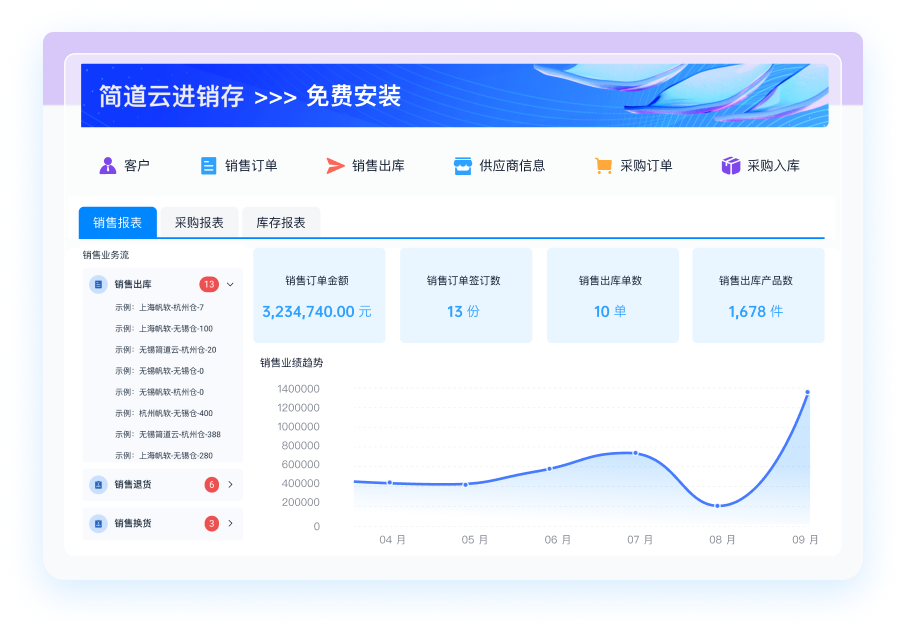
推荐100+企业管理系统模板免费使用>>>无需下载,在线安装:
地址: https://s.fanruan.com/7wtn5;






















































































 《零代码开发知识图谱》
 《零代码
新动能》案例集
《零代码
新动能》案例集
 《企业零代码系统搭建指南》










